
Simplify Webcam Video Collection with One Line of Code
Overview
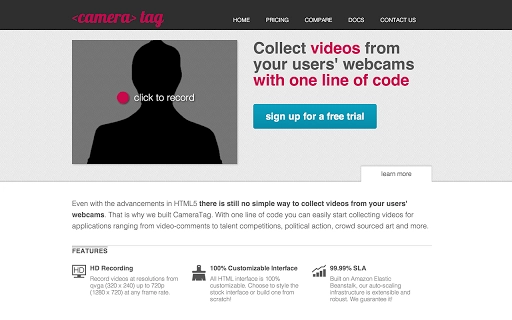
CameraTag is a web-based tool designed to streamline the process of collecting video content directly from users’ webcams. Despite advancements in HTML5, capturing and managing user-generated video remains a complex challenge for developers and content creators alike. CameraTag addresses this gap by offering a simple integration method—requiring only a single line of code—to enable video collection for diverse applications.
Use cases include video comments, talent showcases, political engagement campaigns, and crowd-sourced artistic projects. The software is built for developers and digital content teams who need reliable, scalable video capture without extensive coding effort. While the developer's background is not publicly detailed, the tool's focus on accessibility and simplicity suggests a strong emphasis on developer experience.
It is intended for use in web applications where real-time video input is essential. The tool operates entirely within the browser environment, making it ideal for online platforms seeking to engage users through interactive video content.
Key Features & Capabilities
- One-Line Integration – Developers can embed video collection functionality into any web application with minimal effort, reducing development time and complexity.
- Webcam Access via HTML5 – Leverages native browser capabilities to access user cameras, ensuring compatibility with modern web standards.
- Video Capture and Storage – Enables users to record and submit short video clips directly from their devices, with support for various formats and resolutions.
- Flexible Use Cases – Suitable for applications ranging from interactive video comments to large-scale user-generated content campaigns.
- Secure Data Handling – Designed to process video data securely within the browser, minimizing exposure during transmission.
For example, a nonprofit organization could use CameraTag to collect personal testimonies for a social impact campaign, while an educational platform might integrate it to gather student presentations. The tool supports real-time video capture without requiring users to install additional software. Its lightweight integration model makes it ideal for rapid prototyping and deployment across different platforms. Since it relies on standard web technologies, it avoids dependency on third-party plugins or native app installations.
User Interface, Workflow & Performance
CameraTag operates entirely within the browser, meaning the user interface is rendered through the web application it's embedded in. There is no standalone desktop interface. The workflow begins when a user grants camera access, followed by a simple recording prompt.
The interface is minimal and designed to be unobtrusive, focusing on ease of use. Navigation is handled through standard web controls, and no additional learning curve is expected. The developer did not specify resource usage details, so exact performance metrics such as CPU or RAM consumption remain unknown.
However, since the tool uses native HTML5 APIs, it is expected to perform efficiently on modern devices. Stability is likely maintained through browser-level optimizations, but no official reports on crash rates or error handling were provided. Performance observations are based on general software behavior patterns and the efficiency of standard web APIs.
Compatibility & System Requirements
CameraTag supports Windows, Mac, and Linux operating systems, making it accessible to a broad user base. The installation size is listed at 100 MB, which may include embedded libraries or dependencies required for browser integration. The software is designed for use in web environments, so it does not require a traditional installation process.
Platform compatibility information is limited to the operating systems listed, and no specific hardware requirements were provided. The developer did not specify minimum CPU, RAM, or GPU requirements. Exact system requirements were not listed, and compatibility with older browsers or legacy systems was not confirmed.
Users should ensure their devices support modern web standards, particularly HTML5 video capture, for optimal functionality.
Pros and Cons
Pros
- Minimal integration effort—only one line of code required
- Uses standard HTML5 APIs for broad browser compatibility
- Supports diverse use cases from video comments to large-scale campaigns
- Secure video handling within the browser environment
- Free to use, with no licensing costs
Cons
- No standalone desktop application available
- Limited information on system requirements and performance
- Dependent on user browser settings and permissions
- No official documentation or support details provided
- May not function on older or non-standard browsers
FAQ Section
Is CameraTag compatible with all modern browsers?
CameraTag leverages HTML5 video capture, which is supported by most modern browsers. However, full functionality may depend on browser-specific permissions and updates.
Can I use CameraTag without installing any software?
Yes. CameraTag is a web-based tool that operates within the browser. No installation is required on the user’s device.
Is my video data secure when using CameraTag?
Video data is processed within the browser using standard web security protocols. The tool is designed to minimize exposure during transmission, though end-to-end encryption details were not specified.
Does CameraTag require a license or subscription?
No. CameraTag is available at no cost and does not require a license or subscription for use.
Can I update CameraTag automatically?
As a web-based tool, updates are managed through the hosted version. Users do not need to manually update the software.
Final Thoughts
CameraTag offers a powerful, lightweight solution for developers seeking to integrate webcam video collection into their web applications. Its one-line integration model significantly reduces development overhead, making it ideal for projects that rely on user-generated video content. While it lacks a standalone desktop interface and detailed system specifications, its reliance on standard web technologies ensures broad compatibility and efficient performance.
The tool is particularly beneficial for organizations running campaigns, educational platforms, or interactive websites that value user engagement through video. For developers focused on speed, simplicity, and scalability, CameraTag delivers a compelling value proposition. Its free availability further enhances its appeal.
Download CameraTag now.







